2021年2月22日 星期一

用shell在CentOS 7 安裝編輯器 Geany 1.37.1、Leafpad、Bluefish、Visual Studio Code、Sublime Text 3、Phpstorm 2020.3

 因為在CentOS 7 編寫程式,所以要開始研究編輯器。 


檔案名稱:CenOS7GeanyInstall.sh
檔案內容:
#!/bin/bash
yum install -y gcc-c++
yum install -y intltool
yum install -y libgnomeui-devel
wget https://download.geany.org/geany-1.37.1.tar.gz
tar zxvf geany-1.37.1.tar.gz
rm geany-1.37.1.tar.gz -y
cd geany-1.37.1
./configure
make
make install

如何使用
$chmod 777 CenOS7GeanyInstall.sh
$sudo sh  CenOS7GeanyInstall.sh

檔案名稱:CenOS7LeafpadInstall.sh
檔案內容:
#!/bin/bash
yum install -y epel-release
yum install -y snapd
systemctl enable --now snapd.socket
ln -s /var/lib/snapd/snap /snap
snap install leafpad

如何使用
$chmod 777 CenOS7LeafpadInstall.sh
$sudo sh  CenOS7LeafpadInstall.sh

檔案名稱:CenOS7BluefishInstall.sh
檔案內容:
#!/bin/bash
yum install -y dnf
dnf install -y bluefish 

如何使用
$chmod 777 CenOS7BluefishInstall.sh
$sudo sh  CenOS7BluefishInstall.sh

檔案名稱:CenOS7VisualStudioCodeInstall.sh
檔案內容:
#!/bin/bash
yum install dnf -y
rpm --import https://packages.microsoft.com/keys/microsoft.asc
sh -c 'echo -e "[code]\nname=Visual Studio Code\nbaseurl=https://packages.microsoft.com/yumrepos/vscode\nenabled=1\ngpgcheck=1\ngpgkey=https://packages.microsoft.com/keys/microsoft.asc" > /etc/yum.repos.d/vscode.repo'
dnf check-update
dnf install code

如何使用
$chmod 777 CenOS7VisualStudioCodeInstall.sh
$sudo sh  CenOS7VisualStudioCodeInstall.sh

檔案名稱:CenOS7SublimeText3Install.sh
檔案內容:
#!/bin/bash
rpm -v --import https://download.sublimetext.com/sublimehq-rpm-pub.gpg
yum-config-manager --add-repo https://download.sublimetext.com/rpm/stable/x86_64/sublime-text.repo
yum install -y sublime-text

如何使用
$chmod 777 CenOS7SublimeText3Install.sh
$sudo sh  CenOS7SublimeText3Install.sh

需在視窗環境下安裝
檔案名稱:CenOS7Phpstorm20203Install.sh
檔案內容:
#!/bin/bash
wget https://download-cf.jetbrains.com/webide/PhpStorm-2020.3.tar.gz
tar -xvf PhpStorm-2020.3.tar.gz
mv PhpStorm-203.5981.175 PhpStorm
ln -s ./PhpStorm/bin/phpstorm.sh /usr/bin/phpstorm
echo "#!/bin/bash"  > phpstormsetup.sh
echo "sh ~/PhpStorm/bin/phpstorm.sh"  >> phpstormsetup.sh
chmod 777 phpstormsetup.sh
sh phpstormSetup.sh

如何使用
$chmod 777 CenOS7Phpstorm20203Install.sh
$sudo sh  CenOS7Phpstorm20203Install.sh

如何啟動phpstorm
$sudo sh phpstormSetup.sh 


2021年2月21日 星期日

因ie無法用,秒關並自動導向edge。導致彰化縣公文系統無法簽核。

 感恩永靖國小邱顯席老師的問題解決方案

Edge 設定


資料來源:


只要用滑鼠點兩下,一鍵安裝windows 10 或 windows 7的印表機,以HP DesignJet T530為例

 先前資料:


        現在希望由程式自行判斷作業系統windows 7 64位元、windows 7 32位元、 windows 10 64位元或windows 10 32位元,來安裝印表驅動程式 。


範例檔案下載:解壓密碼demo1234


檔案名稱:10HpT650海報機.bat
檔案內容:
@echo off
set printer_ip=172.20.3.239
rem 要連接印表機用的ip
set printer_name2="教務處新海報機"
rem 機器顯示的名稱

ver|findstr /r /i " [版本 6.1.*]" > NUL && goto Win7
ver|findstr /r /i " [版本 10.0.*]" > NUL && goto Win10

:Win10
if "%PROCESSOR_ARCHITECTURE%" == "x86" goto Win10x86
if "%PROCESSOR_ARCHITECTURE%" == "AMD64" goto Win10x64
rem 針對win10有32跟64位元的判斷

:Win10x86
echo "Win10x86"
set printer_driver="%~dp0AutoInstall\HpT650x32_Win10\hpi2144.inf"
echo 驅動程式所在路徑為 %printer_driver%
set printer_name="HP DesignJet T650 36-in V4"
echo 印表機型號 %printer_name%
rem driver放在同目錄下,路徑用.\來作相對路徑
C:\Windows\system32\cscript.exe C:\Windows\system32\Printing_Admin_Scripts\zh-TW\prnport.vbs -a -r IP_%printer_ip% -h %printer_ip% -o raw -n 9100
rem 新增ip連接阜,已經存在也沒差
rundll32 printui.dll,PrintUIEntry /if /r IP_%printer_ip% /f %printer_driver% /b %printer_name2%_%printer_name% /m %printer_name%
rem 新增印表機,如果已經有同樣名字的也會新增,名字後面會多(複本1)
echo 列表機安裝完成...請按任意鍵結束..
pause
exit 

:Win10x64
echo "Win10x64"
set printer_driver="%~dp0AutoInstall\HpT650x64_Win10\hpi2144.inf"
echo 驅動程式所在路徑為 %printer_driver%
set printer_name="HP DesignJet T650 36-in V4"
echo 印表機型號 %printer_name%
rem driver放在同目錄下,路徑用.\來作相對路徑
C:\Windows\system32\cscript.exe C:\Windows\system32\Printing_Admin_Scripts\zh-TW\prnport.vbs -a -r IP_%printer_ip% -h %printer_ip% -o raw -n 9100
rem 新增ip連接阜,已經存在也沒差
rundll32 printui.dll,PrintUIEntry /if /r IP_%printer_ip% /f %printer_driver% /b %printer_name2%_%printer_name% /m %printer_name%
rem 新增印表機,如果已經有同樣名字的也會新增,名字後面會多(複本1)
echo 列表機安裝完成...請按任意鍵結束..
pause
exit

:Win7
if "%PROCESSOR_ARCHITECTURE%" == "x86" goto Win7x86
if "%PROCESSOR_ARCHITECTURE%" == "AMD64" goto Win7x64
rem 針對win7有32跟64位元的判斷


:Win7x86
echo "Win7x86"
set printer_driver="%~dp0AutoInstall\HpT650x32_Win7\hpixpsdv.inf"
echo 驅動程式所在路徑為 %printer_driver%
set printer_name="HP DesignJet T650 36-in"
echo 印表機型號 %printer_name%
rem driver放在同目錄下,路徑用.\來作相對路徑
C:\Windows\system32\cscript.exe C:\Windows\system32\Printing_Admin_Scripts\zh-TW\prnport.vbs -a -r IP_%printer_ip% -h %printer_ip% -o raw -n 9100
rem 新增ip連接阜,已經存在也沒差
rundll32 printui.dll,PrintUIEntry /if /r IP_%printer_ip% /f %printer_driver% /b %printer_name2%_%printer_name% /m %printer_name%
rem 新增印表機,如果已經有同樣名字的也會新增,名字後面會多(複本1)
echo 列表機安裝完成...請按任意鍵結束..
pause
exit 

:Win7x64
echo "Win7x64"
set printer_driver="%~dp0AutoInstall\HpT650x64_Win7\hpixpsdv.inf"
echo 驅動程式所在路徑為 %printer_driver%
set printer_name="HP DesignJet T650 36-in"
echo 印表機型號 %printer_name%
rem driver放在同目錄下,路徑用.\來作相對路徑
C:\Windows\system32\cscript.exe C:\Windows\system32\Printing_Admin_Scripts\zh-TW\prnport.vbs -a -r IP_%printer_ip% -h %printer_ip% -o raw -n 9100
rem 新增ip連接阜,已經存在也沒差
rundll32 printui.dll,PrintUIEntry /if /r IP_%printer_ip% /f %printer_driver% /b %printer_name2%_%printer_name% /m %printer_name%
rem 新增印表機,如果已經有同樣名字的也會新增,名字後面會多(複本1)
echo 列表機安裝完成...請按任意鍵結束..
pause
exit


如何在Ubuntu系統中,掛載Nas的硬碟

 本文章為從資料來源2,節錄出來的指令。因在實體機器實作成功後,便將其記錄下來。

1.安裝mdadm
$sudo apt-get install -y mdadm 

2.查看欲掛載的硬碟uuid
$blkid

        在檢查的過程中,會出現TYPE="linux_raid_member",注意UUID_SUBLABEL,這個分割區就是存放的地方。
3.手動掛載
$mdadm --assemble --run /dev/md3 /dev/sdc3
其中,/dev/sdc3為指令blkid,顯示的分割區(帶有UUID_SUBLABEL)。

        日後以虛擬機安裝freenas,並進行兩個虛擬硬碟進行鏡像。再將其中一顆掛載在ubuntu虛擬機上,來進行測試。


如何用 shell 在CentOS 7快速安裝HA Proxy 2.3

 一、官方網站:HAProxy

二、下載處

三、可直接使用yum install haproxy,但會安裝1.5 版
其指令如下:
$sudo  yum install haproxy

以下,目前測試有錯。目前正在除錯中。

四、shell安裝2.3 版Ha Proxy
檔案名稱:HaProxy23Install.sh
檔案內容:
#!/bin/bash
yum install -y make gcc wget
wget http://www.haproxy.org/download/2.3/src/haproxy-2.3.2.tar.gz
tar zxvf haproxy-2.3.2.tar.gz
cd ~/haproxy-2.3.2
make TARGET=linux310 ARCH=x86_64 PREFIX=/usr/local/haproxy
make install PREFIX=/usr/local/haproxy
cp /usr/local/haproxy/sbin/haproxy /usr/sbin/
cp examples/haproxy.init /etc/init.d/haproxy
chmod 755 /etc/init.d/haproxy
useradd -r haproxy
mkdir /etc/haproxy
echo "global" > /etc/haproxy/haproxy.cfg
echo "    log         127.0.0.1 local2" >> /etc/haproxy/haproxy.cfg
echo "    chroot      /var/lib/haproxy" >> /etc/haproxy/haproxy.cfg
echo "    pidfile     /var/run/haproxy.pid" >> /etc/haproxy/haproxy.cfg
echo "    maxconn     4000" >> /etc/haproxy/haproxy.cfg
echo "    user        haproxy" >> /etc/haproxy/haproxy.cfg
echo "    group       haproxy" >> /etc/haproxy/haproxy.cfg
echo "    daemon" >> /etc/haproxy/haproxy.cfg
echo "    stats socket /var/lib/haproxy/stats" >> /etc/haproxy/haproxy.cfg
echo "defaults" >> /etc/haproxy/haproxy.cfg
echo "    mode                    http" >> /etc/haproxy/haproxy.cfg
echo "    log                     global" >> /etc/haproxy/haproxy.cfg
echo "    option                  httplog" >> /etc/haproxy/haproxy.cfg
echo "    option                  dontlognull" >> /etc/haproxy/haproxy.cfg
echo "    option http-server-close" >> /etc/haproxy/haproxy.cfg
echo "    option forwardfor       except 127.0.0.0/8" >> /etc/haproxy/haproxy.cfg
echo "    option                  redispatch" >> /etc/haproxy/haproxy.cfg
echo "    retries                 3" >> /etc/haproxy/haproxy.cfg
echo "    timeout http-request    10s" >> /etc/haproxy/haproxy.cfg
echo "    timeout queue           1m" >> /etc/haproxy/haproxy.cfg
echo "    timeout connect         10s" >> /etc/haproxy/haproxy.cfg
echo "    timeout client          1m" >> /etc/haproxy/haproxy.cfg
echo "    timeout server          1m" >> /etc/haproxy/haproxy.cfg
echo "    timeout http-keep-alive 10s" >> /etc/haproxy/haproxy.cfg
echo "    timeout check           10s" >> /etc/haproxy/haproxy.cfg
echo "    maxconn                 3000" >> /etc/haproxy/haproxy.cfg
echo "frontend  main *:5000" >> /etc/haproxy/haproxy.cfg
echo "    acl url_static       path_beg       -i /static /images /javascript /stylesheets" >> /etc/haproxy/haproxy.cfg
echo "    acl url_static       path_end       -i .jpg .gif .png .css .js" >> /etc/haproxy/haproxy.cfg
echo "    use_backend static          if url_static" >> /etc/haproxy/haproxy.cfg
echo "    default_backend             app" >> /etc/haproxy/haproxy.cfg
echo "backend static" >> /etc/haproxy/haproxy.cfg
echo "    balance     roundrobin" >> /etc/haproxy/haproxy.cfg
echo "    server      static 127.0.0.1:4331 check" >> /etc/haproxy/haproxy.cfg
echo "backend app" >> /etc/haproxy/haproxy.cfg
echo "    balance     roundrobin" >> /etc/haproxy/haproxy.cfg
echo "    server  app1 127.0.0.1:5001 check" >> /etc/haproxy/haproxy.cfg
echo "    server  app2 127.0.0.1:5002 check" >> /etc/haproxy/haproxy.cfg
echo "    server  app3 127.0.0.1:5003 check" >> /etc/haproxy/haproxy.cfg
echo "    server  app4 127.0.0.1:5004 check" >> /etc/haproxy/haproxy.cfg
service haproxy start

五、安裝2.3 版Ha Proxy的相關步驟
01.安裝make、gcc、wget
$sudo yum install -y make gcc wget

02.wget Ha Proxy 2.3
$sudo wget http://www.haproxy.org/download/2.3/src/haproxy-2.3.2.tar.gz

03.解壓縮haproxy-2.3.2.tar.gz
$sudo tar zxvf haproxy-2.3.2.tar.gz

04.進入haproxy-2.3.2
$cd haproxy-2.3.2

05.編譯
$sudo make TARGET=linux310 ARCH=x86_64 PREFIX=/usr/local/haproxy

06.安裝Ha Proxy,並將執行檔指定到/usr/local
$sudo make install PREFIX=/usr/local/haproxy

07.將執行檔複製到/usr/sbin/底下
$sudo cp /usr/local/haproxy/sbin/haproxy /usr/sbin/

08.複製啟動腳本檔案到系統中,並調整權限,確保系統可以正常將Haproxy啟動
$sudo cp examples/haproxy.init /etc/init.d/haproxy
$sudo chmod 755 /etc/init.d/haproxy

09.新增使用者帳號haproxy給Haproxy使用
$sudo useradd -r haproxy

10.在/etc/下新增一個haproxy的資料夾,並放入設定檔,檔名為:haproxy.cfg
$mkdir /etc/haproxy
$vi /etc/haproxy/haproxy.cfg
檔案名稱:haproxy.cfg
檔案內容:
global
    log         127.0.0.1 local2
    chroot      /var/lib/haproxy
    pidfile     /var/run/haproxy.pid
    maxconn     4000
    user        haproxy
    group       haproxy
    daemon
    stats socket /var/lib/haproxy/stats

defaults
    mode                    http
    log                     global
    option                  httplog
    option                  dontlognull
    option http-server-close
    option forwardfor       except 127.0.0.0/8
    option                  redispatch
    retries                 3
    timeout http-request    10s
    timeout queue           1m
    timeout connect         10s
    timeout client          1m
    timeout server          1m
    timeout http-keep-alive 10s
    timeout check           10s
    maxconn                 3000

frontend  main *:5000
    acl url_static       path_beg       -i /static /images /javascript /stylesheets
    acl url_static       path_end       -i .jpg .gif .png .css .js
    use_backend static          if url_static
    default_backend             app

backend static
    balance     roundrobin
    server      static 127.0.0.1:4331 check

backend app
    balance     roundrobin
    server  app1 127.0.0.1:5001 check
    server  app2 127.0.0.1:5002 check
    server  app3 127.0.0.1:5003 check
    server  app4 127.0.0.1:5004 check

11.啟動Ha Proxy服務
$service haproxy start

12.啟動、重啟、關閉Ha Proxy服務
#啟動服務
$sudo systemctl start haproxy.service

#重新啟動服務
$sudo systemctl restart haproxy.service

#關閉服務
$sudo systemctl stop haproxy.service


如何用shell在linux mint 20.04 安裝中文輸入法

         自從安裝了linuxmint 桌面版,卻發現沒有中文輸入法,覺得不方便. 開始學安裝中文輸入法

fcitx 精簡安裝
$ sudo apt-get install fcitx fcitx-ui-classic fcitx-config-gtk
新酷音輸入法
$ sudo apt-get install fcitx-chewing
無蝦米輸入法
$ sudo apt-get install fcitx-table-boshiamy

檔案名稱:Zh-TwInput.sh
檔案內容:
#!/bin/bash
apt-get install fcitx fcitx-ui-classic fcitx-config-gtk
apt-get install fcitx-chewing
apt-get install fcitx-table-boshiamy

使用方法:
$sudo chmod 777 Zh-TwInput.sh
$sudo sh Zh-TwInput.sh

資料來源:


在docker-nginx-php-mysql開發環境,建立一個簡單的 PHP REST API (二)

 前篇:在docker-nginx-php-mysql開發環境,建立一個簡單的 PHP REST API (一)

        自從完成在docker-nginx-php-mysql開發環境,建立一個簡單的 PHP REST API (一),開始對PHP REST API 有初步了解。希望能夠再進一步實作,因此以How To Create A Simple REST API in PHP? Step By Step Guide!為範本,進行實作。
        首先建立開發環境,以docker來做。使用資料依據為

一、shell檔案快速完成

檔名:DockerEnvInstall.sh
檔案內容:
#!/bin/bash
yum remove docker \
                  docker-client \
                  docker-client-latest \
                  docker-common \
                  docker-latest \
                  docker-latest-logrotate \
                  docker-logrotate \
                  docker-engine
yum install -y yum-utils
yum-config-manager \
    --add-repo \
    https://download.docker.com/linux/centos/docker-ce.repo
yum install docker-ce docker-ce-cli containerd.io
systemctl start docker
curl -L "https://github.com/docker/compose/releases/download/1.27.4/docker-compose-$(uname -s)-$(uname -m)" -o /usr/local/bin/docker-compose
chmod +x /usr/local/bin/docker-compose
docker-compose version
yum install git
mkdir test01
cd test01
git clone https://github.com/mark2470mark/docker-nginx-php-mysql.git
cd ~/test01/docker-nginx-php-mysql
docker-compose up -d
docker-compose ps

重開機後,需要啟動docker,才能執行docker-compose up -d 等指令。
$sudo systemctl start docker

二、設定DockerEnvInstall.sh為可執行

$sudo chmod 755 DockerEnvInstall.sh
$sudo sh DockerEnvInstall.sh
此時的開發環境

三、建立資料庫

1.瀏覽器網址打上 http://IP:8080,進入phpmyadmin

 (1)建立資料庫 api_db

(2)建立資料表categories

複製SQL語法如下:
CREATE TABLE IF NOT EXISTS `categories` (
  `id` int(11) NOT NULL AUTO_INCREMENT,
  `name` varchar(256) NOT NULL,
  `description` text NOT NULL,
  `created` datetime NOT NULL,
  `modified` timestamp NOT NULL DEFAULT CURRENT_TIMESTAMP,
  PRIMARY KEY (`id`)
) ENGINE=InnoDB  DEFAULT CHARSET=utf8 AUTO_INCREMENT=19 ;

(3) 在資料表categories填入資料

複製SQL語法如下:
INSERT INTO `categories` (`id`, `name`, `description`, `created`, `modified`) VALUES
(1, 'Fashion', 'Category for anything related to fashion.', '2014-06-01 00:35:07', '2014-05-30 17:34:33'),
(2, 'Electronics', 'Gadgets, drones and more.', '2014-06-01 00:35:07', '2014-05-30 17:34:33'),
(3, 'Motors', 'Motor sports and more', '2014-06-01 00:35:07', '2014-05-30 17:34:54'),
(5, 'Movies', 'Movie products.', '0000-00-00 00:00:00', '2016-01-08 13:27:26'),
(6, 'Books', 'Kindle books, audio books and more.', '0000-00-00 00:00:00', '2016-01-08 13:27:47'),
(13, 'Sports', 'Drop into new winter gear.', '2016-01-09 02:24:24', '2016-01-09 01:24:24');

(4)建立資料表product

複製SQL語法如下:
CREATE TABLE IF NOT EXISTS `products` (
  `id` int(11) NOT NULL AUTO_INCREMENT,
  `name` varchar(32) NOT NULL,
  `description` text NOT NULL,
  `price` decimal(10,0) NOT NULL,
  `category_id` int(11) NOT NULL,
  `created` datetime NOT NULL,
  `modified` timestamp NOT NULL DEFAULT CURRENT_TIMESTAMP,
  PRIMARY KEY (`id`)
) ENGINE=InnoDB  DEFAULT CHARSET=latin1 AUTO_INCREMENT=65 ;

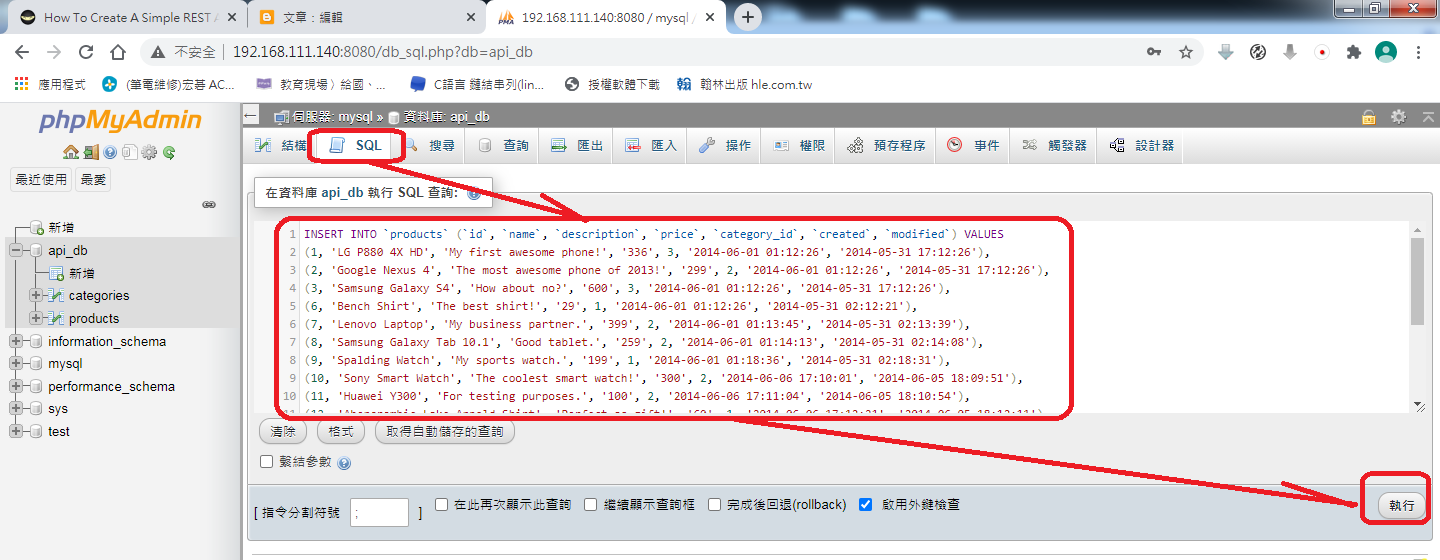
(5) 在資料表product填入資料

複製SQL語法如下:
INSERT INTO `products` (`id`, `name`, `description`, `price`, `category_id`, `created`, `modified`) VALUES
(1, 'LG P880 4X HD', 'My first awesome phone!', '336', 3, '2014-06-01 01:12:26', '2014-05-31 17:12:26'),
(2, 'Google Nexus 4', 'The most awesome phone of 2013!', '299', 2, '2014-06-01 01:12:26', '2014-05-31 17:12:26'),
(3, 'Samsung Galaxy S4', 'How about no?', '600', 3, '2014-06-01 01:12:26', '2014-05-31 17:12:26'),
(6, 'Bench Shirt', 'The best shirt!', '29', 1, '2014-06-01 01:12:26', '2014-05-31 02:12:21'),
(7, 'Lenovo Laptop', 'My business partner.', '399', 2, '2014-06-01 01:13:45', '2014-05-31 02:13:39'),
(8, 'Samsung Galaxy Tab 10.1', 'Good tablet.', '259', 2, '2014-06-01 01:14:13', '2014-05-31 02:14:08'),
(9, 'Spalding Watch', 'My sports watch.', '199', 1, '2014-06-01 01:18:36', '2014-05-31 02:18:31'),
(10, 'Sony Smart Watch', 'The coolest smart watch!', '300', 2, '2014-06-06 17:10:01', '2014-06-05 18:09:51'),
(11, 'Huawei Y300', 'For testing purposes.', '100', 2, '2014-06-06 17:11:04', '2014-06-05 18:10:54'),
(12, 'Abercrombie Lake Arnold Shirt', 'Perfect as gift!', '60', 1, '2014-06-06 17:12:21', '2014-06-05 18:12:11'),
(13, 'Abercrombie Allen Brook Shirt', 'Cool red shirt!', '70', 1, '2014-06-06 17:12:59', '2014-06-05 18:12:49'),
(26, 'Another product', 'Awesome product!', '555', 2, '2014-11-22 19:07:34', '2014-11-21 20:07:34'),
(28, 'Wallet', 'You can absolutely use this one!', '799', 6, '2014-12-04 21:12:03', '2014-12-03 22:12:03'),
(31, 'Amanda Waller Shirt', 'New awesome shirt!', '333', 1, '2014-12-13 00:52:54', '2014-12-12 01:52:54'),
(42, 'Nike Shoes for Men', 'Nike Shoes', '12999', 3, '2015-12-12 06:47:08', '2015-12-12 05:47:08'),
(48, 'Bristol Shoes', 'Awesome shoes.', '999', 5, '2016-01-08 06:36:37', '2016-01-08 05:36:37'),
(60, 'Rolex Watch', 'Luxury watch.', '25000', 1, '2016-01-11 15:46:02', '2016-01-11 14:46:02');

2.建立database.php

由於在docker-nginx-php-mysql開發環境中,
在原本docker-nginx-php-mysql/docker-compose.yml,

(1)在web/public/,建立資料夾api

$ sudo mkdir api
$ cd api/ 

(2)在web/public/api/,建立資料夾config


$ mkdir config
$ cd config/

(3)建立database.php


$ pico database.php
檔案名稱:database.php
檔案內容:
<?php
class Database{
  
    // specify your own database credentials
    private $host = "mysql";
    private $db_name = "api_db";
    private $username = "root";
    private $password = "a123456";
    public $conn;
  
    // get the database connection
    public function getConnection(){
  
        $this->conn = null;
  
        try{
            $this->conn = new PDO("mysql:host=" . $this->host . ";dbname=" . $this->db_name, $this->username, $this->password);
            $this->conn->exec("set names utf8");
        }catch(PDOException $exception){
            echo "Connection error: " . $exception->getMessage();
        }
  
        return $this->conn;
    }
}
?>

(4)在web/public/建立TestDatabaseConn.php,測試資料庫是否正確連線

檔案名稱:TestDatabaseConn.php
檔案內容:
<?php
$test01 = include 'api/config/database.php';
echo $test01."<br>";
$database = new database;
print_r($database->getConnection());
?>
測試結果

3.建立product.php

(1)在web/public/api/,建立資料夾objects


$cd ..
$cd web/public/api
$mkdir objects

(2)在web/public/api/objects,建立product.php


$cd product
$pico product.php
檔案名稱:product.php
檔案內容:
<?php
class Product{
  
    // database connection and table name
    private $conn;
    private $table_name = "products";
  
    // object properties
    public $id;
    public $name;
    public $description;
    public $price;
    public $category_id;
    public $category_name;
    public $created;
  
    // constructor with $db as database connection
    public function __construct($db){
        $this->conn = $db;
    }

   // read products
   function read(){
  
       // select all query
 $query = "SELECT c.name as category_name,p.id,p.name,p.description,p.price,p.category_id,p.created
                  FROM" . $this->table_name . " p
                  LEFT JOIN categories c
                 ON p.category_id = c.id
                 ORDER BY p.created DESC";
  
       // prepare query statement
       $stmt = $this->conn->prepare($query);
  
       // execute query
       $stmt->execute();
  
       return $stmt;
   }
// create product
function create(){
  
    // query to insert record
    $query = "INSERT INTO" . $this->table_name . "
                     SET name=:name, price=:price, description=:description, category_id=:category_id, 
                             created=:created";
  
    // prepare query
    $stmt = $this->conn->prepare($query);
  
    // sanitize
    $this->name=htmlspecialchars(strip_tags($this->name));
    $this->price=htmlspecialchars(strip_tags($this->price));
    $this->description=htmlspecialchars(strip_tags($this->description));
    $this->category_id=htmlspecialchars(strip_tags($this->category_id));
    $this->created=htmlspecialchars(strip_tags($this->created));
  
    // bind values
    $stmt->bindParam(":name", $this->name);
    $stmt->bindParam(":price", $this->price);
    $stmt->bindParam(":description", $this->description);
    $stmt->bindParam(":category_id", $this->category_id);
    $stmt->bindParam(":created", $this->created);
  
    // execute query
    if($stmt->execute()){
        return true;
    }
    return false;
}
// used when filling up the update product form
function readOne(){
  
    // query to read single record
    $query = 
      "SELECT  c.name as category_name, p.id, p.name, p.description, p.price, p.category_id, p.created
        FROM " . $this->table_name . " p
        LEFT JOIN categories c
        ON p.category_id = c.id
        WHERE p.id = ?
        LIMIT 0,1";
  
    // prepare query statement
    $stmt = $this->conn->prepare( $query );
  
    // bind id of product to be updated
    $stmt->bindParam(1, $this->id);
  
    // execute query
    $stmt->execute();
  
    // get retrieved row
    $row = $stmt->fetch(PDO::FETCH_ASSOC);
  
    // set values to object properties
    $this->name = $row['name'];
    $this->price = $row['price'];
    $this->description = $row['description'];
    $this->category_id = $row['category_id'];
    $this->category_name = $row['category_name'];
}
// update the product
function update(){

    // update query
    $query = "UPDATE" . $this->table_name . "
              SET name = :name,
                      price = :price,
                      description = :description,
                      category_id = :category_id
              WHERE id = :id";

    // prepare query statement
    $stmt = $this->conn->prepare($query);

    // sanitize
    $this->name=htmlspecialchars(strip_tags($this->name));
    $this->price=htmlspecialchars(strip_tags($this->price));
    $this->description=htmlspecialchars(strip_tags($this->description));
    $this->category_id=htmlspecialchars(strip_tags($this->category_id));
    $this->id=htmlspecialchars(strip_tags($this->id));

    // bind new values
    $stmt->bindParam(':name', $this->name);
    $stmt->bindParam(':price', $this->price);
    $stmt->bindParam(':description', $this->description);
    $stmt->bindParam(':category_id', $this->category_id);
    $stmt->bindParam(':id', $this->id);

    // execute the query
    if($stmt->execute()){
        return true;
    }

    return false;
}

}
?>

4.建立read.php

(1)在web/public/api/,建立資料夾product


$cd ..
$mkdir product 

(2)在web/public/api/product/,建立read.php


$cd product
$pico read.php
檔案名稱:read.php
檔案內容:
<?php
// required headers
header("Access-Control-Allow-Origin: *");
header("Content-Type: application/json; charset=UTF-8");
  
// include database and object files
include_once '../config/database.php';
include_once '../objects/product.php';
  
// instantiate database and product object
$database = new Database();
$db = $database->getConnection();
  
// initialize object
$product = new Product($db);
  
// query products
$stmt = $product->read();
$num = $stmt->rowCount();
  
// check if more than 0 record found
if($num>0){
  
    // products array
    $products_arr=array();
    $products_arr["records"]=array();
  
    // retrieve our table contents
    // fetch() is faster than fetchAll()
    // http://stackoverflow.com/questions/2770630/pdofetchall-vs-pdofetch-in-a-loop
    while ($row = $stmt->fetch(PDO::FETCH_ASSOC)){
        // extract row
        // this will make $row['name'] to
        // just $name only
        extract($row);
  
        $product_item=array(
            "id" => $id,
            "name" => $name,
            "description" => html_entity_decode($description),
            "price" => $price,
            "category_id" => $category_id,
            "category_name" => $category_name
        );
  
        array_push($products_arr["records"], $product_item);
    }
  
    // set response code - 200 OK
    http_response_code(200);
  
    // show products data in json format
    echo json_encode($products_arr);
else {
  
    // set response code - 404 Not found
    http_response_code(404);
  
    // tell the user no products found
    echo json_encode(
        array("message" => "No products found.")
    );
}
?>

5.建立create.php

(1)在web/public/api/product/,建立create.php

檔案名稱:create.php
檔案內容:
<?php
// required headers
header("Access-Control-Allow-Origin: *");
header("Content-Type: application/json; charset=UTF-8");
header("Access-Control-Allow-Methods: POST");
header("Access-Control-Max-Age: 3600");
header("Access-Control-Allow-Headers: Content-Type, Access-Control-Allow-Headers, Authorization, X-Requested-With");
  
// get database connection
include_once '../config/database.php';
  
// instantiate product object
include_once '../objects/product.php';
  
$database = new Database();
$db = $database->getConnection();
  
$product = new Product($db);
  
// get posted data
$data = json_decode(file_get_contents("php://input"));
  
// make sure data is not empty
if(
    !empty($data->name) &&
    !empty($data->price) &&
    !empty($data->description) &&
    !empty($data->category_id)
){
  
    // set product property values
    $product->name = $data->name;
    $product->price = $data->price;
    $product->description = $data->description;
    $product->category_id = $data->category_id;
    $product->created = date('Y-m-d H:i:s');
  
    // create the product
    if($product->create()){
  
        // set response code - 201 created
        http_response_code(201);
  
        // tell the user
        echo json_encode(array("message" => "Product was created."));
    }
  
    // if unable to create the product, tell the user
    else{
  
        // set response code - 503 service unavailable
        http_response_code(503);
  
        // tell the user
        echo json_encode(array("message" => "Unable to create product."));
    }
}
  
// tell the user data is incomplete
else{
  
    // set response code - 400 bad request
    http_response_code(400);
  
    // tell the user
    echo json_encode(array("message" => "Unable to create product. Data is incomplete."));
}
?>

6.使用postman來測試寫好的API

Chrome 擴充功能版 : 下載連結
如下圖:
                              
步驟1.點選POST
步驟2.輸入網址:http://IP/api/product/create.php
以目前作者測試的網址為http://192.168.111.140/api/product/create.php
步驟3.點選Body
步驟4.點選raw
步驟5.輸入的JSON如下:
{
    "name" : "Amazing Pillow 2.0",
    "price" : "199",
    "description" : "The best pillow for amazing programmers.",
    "category_id" : 2,
    "created" : "2018-06-01 00:35:07"
}
步驟6.點選Send
就會得到步驟7.JSON
{
    "message": "Product was created."
}
就會出現
{"records":[{"id":"1","name":"Amazing Pillow 2.0","description":"The best pillow for amazing programmers.","price":"199","category_id":"2","category_name":"Electronics"}]}

7.建立read_one.php

(1)在web/api/product/,建立read_one.php

檔案名稱:read_one.php
檔案內容:
<?php
// required headers
header("Access-Control-Allow-Origin: *");
header("Access-Control-Allow-Headers: access");
header("Access-Control-Allow-Methods: GET");
header("Access-Control-Allow-Credentials: true");
header('Content-Type: application/json');
  
// include database and object files
include_once '../config/database.php';
include_once '../objects/product.php';
  
// get database connection
$database = new Database();
$db = $database->getConnection();
  
// prepare product object
$product = new Product($db);
  
// set ID property of record to read
$product->id = isset($_GET['id']) ? $_GET['id'] : die();
  
// read the details of product to be edited
$product->readOne();
  
 if($product->name!=null) {
    // create array
    $product_arr = array(
        "id" =>  $product->id,
        "name" => $product->name,
        "description" => $product->description,
        "price" => $product->price,
        "category_id" => $product->category_id,
        "category_name" => $product->category_name 
     );
  
    // set response code - 200 OK
    http_response_code(200);
  
    // make it json format
    echo json_encode($product_arr);
} else {
    // set response code - 404 Not found
    http_response_code(404);
  
    // tell the user product does not exist
    echo json_encode(array("message" => "Product does not exist."));
}
?>

(2)使用postman來測試寫好的API

8.建立update.php

(1)在web/api/product/,建立update.php

檔案名稱:update.php
檔案內容:
<?php
// required headers
header("Access-Control-Allow-Origin: *");
header("Content-Type: application/json; charset=UTF-8");
header("Access-Control-Allow-Methods: POST");
header("Access-Control-Max-Age: 3600");
header("Access-Control-Allow-Headers: Content-Type, Access-Control-Allow-Headers, Authorization, X-Requested-With");
 
// include database and object files
include_once '../config/database.php';
include_once '../objects/product.php';
 
// get database connection
$database = new Database();
$db = $database->getConnection();
 
// prepare product object
$product = new Product($db);
 
// get id of product to be edited
$data = json_decode(file_get_contents("php://input"));
 
// set ID property of product to be edited
$product->id = $data->id;
 
// set product property values
$product->name = $data->name;
$product->price = $data->price;
$product->description = $data->description;
$product->category_id = $data->category_id;
 
// update the product
if($product->update()){
 
    // set response code - 200 ok
    http_response_code(200);
 
    // tell the user
    echo json_encode(array("message" => "Product was updated."));
}
 
// if unable to update the product, tell the user
else{
 
    // set response code - 503 service unavailable
    http_response_code(503);
 
    // tell the user
    echo json_encode(array("message" => "Unable to update product."));
}
?>

 
(2)
 

只要點兩下,就能將input資料夾內所有m4a 轉檔為 mp3

         最近需要將m4a檔案轉檔為mp3,所以寫python程式來處理。希望將很多的m4a放進input資料夾內,只要點兩下滑鼠就能將這些m4a 通通轉檔為 mp3。          Recently, I needed to convert M4A files in...